https://www.howtogeek.com/427982/how-to-encrypt-and-decrypt-files-with-gpg-on-linux/
Thursday, April 23, 2020

Monday, April 13, 2020
2 Ways to Create an ISO from a Bootable USB in Linux
https://www.tecmint.com/create-an-iso-from-a-bootable-usb-in-linux/
Sunday, February 24, 2019
How to change welcome message (motd) on Ubuntu 18.04 server
/etc/update-motd.d/
https://linuxconfig.org/how-to-change-welcome-message-motd-on-ubuntu-18-04-server

https://linuxconfig.org/how-to-change-welcome-message-motd-on-ubuntu-18-04-server

Wednesday, December 19, 2018
R-linux export QT_X11_NO_MITSHM=1
CODE: SELECT ALL
X Error: BadAccess (attempt to access private resource denied) 10 Extension: 130 (MIT-SHM) Minor opcode: 1 (X_ShmAttach) Resource id: 0x13d X Error: BadShmSeg (invalid shared segment parameter) 128 Extension: 130 (MIT-SHM) Minor opcode: 5 (X_ShmCreatePixmap) Resource id: 0x2a00013 X Error: BadDrawable (invalid Pixmap or Window parameter) 9 Major opcode: 62 (X_CopyArea) Resource id: 0x2a00014 X Error: BadDrawable (invalid Pixmap or Window parameter) 9 Major opcode: 62 (X_CopyArea) Resource id: 0x2a00014 X Error: BadPixmap (invalid Pixmap parameter) 4 Major opcode: 54 (X_FreePixmap) Resource id: 0x2a00014 X Error: BadShmSeg (invalid shared segment parameter) 128 Extension: 130 (MIT-SHM) Minor opcode: 2 (X_ShmDetach) Resource id: 0x2a00013 X Error: BadAccess (attempt to access private resource denied) 10 Extension: 130 (MIT-SHM) Minor opcode: 1 (X_ShmAttach) Resource id: 0x13d X Error: BadShmSeg (invalid shared segment parameter) 128 Extension: 130 (MIT-SHM) Minor opcode: 5 (X_ShmCreatePixmap) Resource id: 0x2a0001e X Error: BadDrawable (invalid Pixmap or Window parameter) 9 Major opcode: 62 (X_CopyArea) Resource id: 0x2a0001f X Error: BadDrawable (invalid Pixmap or Window parameter) 9 Major opcode: 62 (X_CopyArea) Resource id: 0x2a0001f X Error: BadPixmap (invalid Pixmap parameter) 4 Major opcode: 54 (X_FreePixmap) Resource id: 0x2a0001f X Error: BadShmSeg (invalid shared segment parameter) 128 Extension: 130 (MIT-SHM) Minor opcode: 2 (X_ShmDetach) Resource id: 0x2a0001e [zerophase@localhost ~]$ sudo rlinux X Error: BadAccess (attempt to access private resource denied) 10 Extension: 130 (MIT-SHM) Minor opcode: 1 (X_ShmAttach) Resource id: 0x13d X Error: BadShmSeg (invalid shared segment parameter) 128 Extension: 130 (MIT-SHM) Minor opcode: 5 (X_ShmCreatePixmap) Resource id: 0x2a0000f X Error: BadDrawable (invalid Pixmap or Window parameter) 9 Major opcode: 62 (X_CopyArea) Resource id: 0x2a00010 X Error: BadDrawable (invalid Pixmap or Window parameter) 9 Major opcode: 62 (X_CopyArea) Resource id: 0x2a00010 X Error: BadPixmap (invalid Pixmap parameter) 4 Major opcode: 54 (X_FreePixmap) Resource id: 0x2a00010 X Error: BadShmSeg (invalid shared segment parameter) 128 Extension: 130 (MIT-SHM) Minor opcode: 2 (X_ShmDetach) Resource id: 0x2a0000f X Error: BadAccess (attempt to access private resource denied) 10 Extension: 130 (MIT-SHM) Minor opcode: 1 (X_ShmAttach) Resource id: 0x13d X Error: BadShmSeg (invalid shared segment parameter) 128 Extension: 130 (MIT-SHM) Minor opcode: 5 (X_ShmCreatePixmap) Resource id: 0x2a0001a X Error: BadDrawable (invalid Pixmap or Window parameter) 9 Major opcode: 62 (X_CopyArea) Resource id: 0x2a0001b X Error: BadDrawable (invalid Pixmap or Window parameter) 9 Major opcode: 62 (X_CopyArea) Resource id: 0x2a0001b X Error: BadPixmap (invalid Pixmap parameter) 4 Major opcode: 54 (X_FreePixmap) Resource id: 0x2a0001b X Error: BadShmSeg (invalid shared segment parameter) 128 Extension: 130 (MIT-SHM) Minor opcode: 2 (X_ShmDetach) Resource id: 0x2a0001aJust addexport QT_X11_NO_MITSHM=1to gui working
Sunday, November 4, 2018
Solving slowdown in NoMachine performances with GNOME 3

Just leave the gnome 3 heavy graphical manager and use somewhat lighter. for example gnome fall back or mate.
https://www.nomachine.com/AR12L00831
https://www.nomachine.com/AR07K00676
https://www.nomachine.com/AR07K00676
Sunday, September 16, 2018

Thursday, August 9, 2018
Sunday, June 10, 2018
How to Configure Internet access on a CentOS Minimal install
May
By default a CentOS minimal install can't connect to the network or the internet, in order to configure it to access the outside world you need to follow the following steps:
1. Configure the DHCP client on the default network interface eth0 by executing the following command:
dhclient eth0
2. Edit the main network configuration file to make sure networking is enabled using the command
vi /etc/sysconfig/network
and make sure that it has networking set to yes
NETWORKING=yes
3. Edit the network configuration file for eth0 to enable it to use a dynamic ip using dhcp
vi /etc/sysconfig/network-scripts/ifcfg-eth0
4. Modify the file to have the following
DEVICE="eth0"
BOOTPROTO="dhcp"
ONBOOT="yes"
NM_CONTROLLED="no"
4. Save the file and then restart the network service using the following command
service network restart
5. Make sure that eh0 has pulled an IP using the following command
ifconfig
Sunday, May 13, 2018
Tun Ubuntu 18.04 in Enhanced Mode in Hyper-V
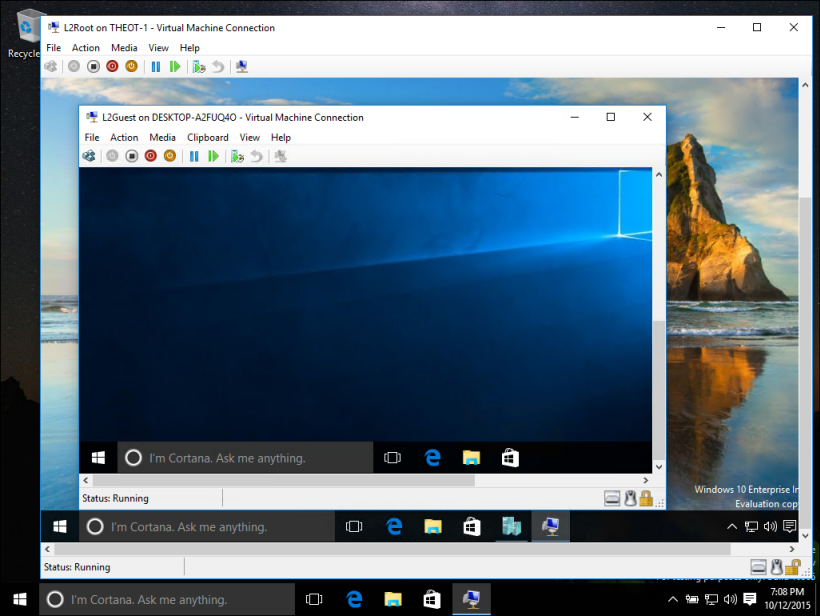
Hyper-V
Install ubuntu in generation 2 mode
Un-check secure boot
Ubuntu OS
#Get the scripts from GitHub
$ sudo apt-get update
$ sudo apt install git
$ git clone https://github.com/jterry75/xrdp-init.git ~/xrdp-init
#Make the scripts executable and run them...
$ cd ~/xrdp-init/ubuntu/18.04/
$ sudo chmod +x install.sh
$ sudo ./install.sh
$ reboot
Windows powershell in administratoe mode:
Set-VM -VMName Ubuntu -EnhancedSessionTransportType HvSocket
Log-in
UNCHECK Printers in local resources.
Saturday, March 3, 2018
Unable to start the geometry editor ANSYS WB on CENTOS
export LD_LIBRARY_PATH=/usr/ansys_inc/v172/Framework/bin/Linux64/Mesa
sudo nano ~/.bashrc
export LD_LIBRARY_PATH=/usr/ansys_inc/v180/Framework/bin/Linux64/Mesa
Monday, January 22, 2018
Virtualbox shared folder permissions

Solution 1
Edit the file
/etc/group. Look for the line vboxsf:x:999 and add at the end :yourusername
Solution 2
Run
sudo adduser yourusername vboxsfSunday, December 10, 2017
Fluent 17.2 C++compiler

For the case if you have troubles with C++ compiler and tools installation and some bugs, the following workaround will help you.
1) Download and install Microsoft Visual studio, say 2015.
2) Browse to C:\Program Files\ANSYS Inc\v172\fluent\ntbin\win64 and backup udf.bat to udf.bat.ORIG
3) Place the following code to udf.bat
@echo off
rem ---
rem MS Visual C++
rem ---
set MSVC=
set MSVC_VERSION=0
set MSVC_VERSION=172
call "c:\Program Files (x86)\Microsoft Visual Studio\2017\Community\VC\Auxiliary\Build\vcvarsall.bat" x86_amd64
echo Detected MSVC%MSVC_VERSION% under ""
echo path=%path%
echo include=%include%
echo lib=%lib%
4) Make sue that in Fluent launcher on the Environment Tab the the Set up Compilation Environment for UDF checkbox is picked up.
Enjoy...
Also useful information can be found here - COMPILING AND LOADING USER DEFINED FUNCTIONS USING FLUENT 14.5 OR 15.0
Saturday, December 9, 2017

Wednesday, November 1, 2017
mpurun error 19 more processes have sent help message help-mpi-btl-base.txt / btl:no-nics Set MCA parameter "orte_base_help_aggregate" to 0 to see all help / error messages
If you get mpurun error as
N more processes have sent help message help-mpi-btl-base.txt / btl:no-nics
Set MCA parameter "orte_base_help_aggregate" to 0 to see all help / error messages
the workaround is to add to the command
--mca btl ^openib
to disable the openib btl
Monday, June 26, 2017

Saturday, May 13, 2017
Adobe Acrobat in Ubuntu 16.04
sudo add-apt-repository "deb http://archive.canonical.com/ precise partner"
sudo apt-get update
sudo apt install adobereader-enu
sudo add-apt-repository -r "deb http://archive.canonical.com/ precise partner"Sunday, May 7, 2017
Tuesday, December 13, 2016
FFT with window normalization: python implementation

We consider the harmonic function of a field as follows:
x = amp* sin(2*pi*f*t)
Here, amp is the amplitude of the field, i.e, displacement or pressure, f is the frequency of the harmonic signal and the t is the time (parameter).
If we want to deal with RMS of the sinusoid signal than ampl/sqrt(2) should be used. Before performing Discrete Fourier Transform it is good practice to window signal in order to decreases leakage, etc.
Transforming the harmonic signal into frequency domain, two-sided spectrum is obtained. Normalization should be done done by dividing values of magnitude by energy of the window. If we to take signal "as it is" (which is equal to applying rectangular window) the spectrum is then divided by number of samples N. For different types of windows this factor that is equal to sum of all window samples.
Additionally we are only interested in one half of a spectrum, therefore amplitude of all samples must be multiplied by two to compensate the loss of energy, except of DC component which appears only once.
So the python code is as follows.
import numpy as np
import matplotlib.pyplot as plt
from scipy import signal as mySignal
from scipy.signal import argrelextrema
plt.close('all')
f1 = 1
f2 = 2
f3 = 3
T1 = 1/f1
T2 = 1/f2
T3 = 1/f3
fs = f1*20
duration = 1/f3*8
npts = int(fs*duration)
t = np.arange(npts, dtype=float)/fs
amp1 = 1
amp2 = 2
amp3 = 3
signal = amp1 * np.sin((f1*duration) * np.linspace(0, 2*np.pi, npts)) + amp2 * np.sin((f2*duration) * np.linspace(0, 2*np.pi, npts)) + amp3 * np.sin((f3*duration) * np.linspace(0, 2*np.pi, npts))
signal3 =amp3 * np.sin((f3*duration) * np.linspace(0, 2*np.pi, npts))
plt.figure(1)
plt.subplot(2,1,1)
plt.plot(t, signal)
# Window signal
win_hamming = np.hamming(npts)
win_boxcar = mySignal.boxcar(npts)
win = win_boxcar
#win = win_hamming
signal = signal * win
plt.plot(t, signal)
plt.plot(t, signal3,linewidth=10)
plt.title("Boxcar window")
plt.ylabel("Amplitude")
plt.xlabel("Time,s")
sp = np.fft.fft(signal)
freq = np.fft.fftfreq(npts, 1.0/fs)
# Scale the magnitude of FFT by window energy and factor of 2,
# because we are using half of FFT.
sp_mag = np.abs(sp) * 2 / np.sum(win)
# To obtain RMS values, divide by sqrt(2)
sp_rms = sp_mag / np.sqrt(2)
# Shift both vectors to have DC at center
freq = np.fft.fftshift(freq)
sp_rms = np.fft.fftshift(sp_rms)
x = sp_rms*np.sqrt(2.0)
m = argrelextrema(x, np.greater) #array of indexes of the locals maxima
freq_local = [freq[m] for i in m]
sp_rms_local = [sp_rms[m]*np.sqrt(2.0) for i in m]
print(freq_local)
print(sp_rms_local)
plt.subplot(2,1,2)
plt.plot(freq, sp_rms*np.sqrt(2.0))
plt.plot(freq_local, sp_rms_local, 'rs')
plt.xlim( (0, f1*2) )
plt.grid('on')
plt.show()
Monday, November 21, 2016
Symmetry in Mathematics and in Physics

- An obvious symmetry is invariance with respect to space which dictates that if the location at which an experiment is performed is changed the results of the experiment will nonetheless be the same.
- Another symmetry, invariance with respect to time, mandates that the results of an experiment will stay the same even if the time that an experiment is performed changes.
In 1918 symmetry became even more relevant to (the philosophy of) physics when Emmy Noether proved a celebrated theorem that connected symmetry to the conservation laws that permeate physics. The theorem states that for every continuous symmetry of the laws of physics, there must exist a related conservation law. Furthermore, for every conservation law, there must exist a related continuous symmetry.
- For example, the fact that the laws of physics are invariant with respect to space corresponds to conservation of linear momentum.The law says that within a closed system the total linear momentum will not change and the law is “mandated” by the symmetry of space.
- Time invariance corresponds to conservation of energy.
- Orientation invariance corresponds to conservation of angular momentum
Noether’s theorem had a profound effect on the workings of physics. Whereas physics formerly first looked for conservation laws, it now looked for different types of symmetries and derived the conservation laws from them. Increasingly, symmetries became the defining factor in physics.
Physics also respects another symmetry, which as far as we know has not been articulated as such. The symmetry we refer to is similar to the symmetry of time and place that was obvious for millennia but not articulated until the last century. Namely, a law of physics is applicable to a class of physical objects such that one can exchange one physical object of the appropriate type for another of that type with the law remaining the same. Consider classical mechanics. The laws for classical mechanics work for all medium sized objects not moving close to the speed of light. In other words, if a law works for an apple, the law will also work for a moon. Quantities like size and distance must be accounted for, but when a law is stated in its correct form, all the different possibilities for the physical entities are clear, and the law works for all of them. We shall call this invariance for a law of nature, symmetry of applicability, i.e. a law is invariant with respect to exchanging the objects to which the law is applied.
To sum up our main point, philosophically the change in the role of symmetry has been revolutionary. Physicists have realized that symmetry is the defining property of laws of physics. In the past, the “motto” was that a law of physics respects symmetries. In contrast, the view since Einstein is: that which respects symmetries is a law of physics. In other words, when looking at the physical phenomena, the physicists picks out those those that satisfy certain symmetries and declares those classes of phenomena to be operating under a law of physics. Stenger summarizes this view as follows:
“. . . the laws of physics are simply restrictions on the ways physicists may draw the models they use to represent the behavior of matter”. !!!
They are restricted because they must respect symmetries. From this perspective, a physicist observing phenomena is not passively taking in the laws of physics. Rather the observer plays an active role. She looks at all phenomena and picks out those that satisfy the requisite symmetries.
Our main point is that this uniform transformation and the fact that statements remain true under such a transformation is a type of symmetry. Recall, a symmetry allows us to change or transform an object or “law” and still keep some vital property invariant.
As with physics, in the past whereas we used to understand that:
"A mathematical statement satisfies symmetry of semantics".
We now claim that:
"A statement that satisfies symmetry of semantics is a mathematical statement."
In other words, given the many expressible statements a mathematician finds, her job is to choose and organize those that satisfy symmetry of semantics.
Subscribe to:
Posts (Atom)